BackupMunk Enterprise
Self-hosted backup
Backups you can actually restore
BackupMunk Enterprise is centrally managed backup for the servers you run yourself: Docker Compose applications and Linux, Windows and macOS file systems.
A self-hosted server holds the schedules, credentials, encryption keys and restore console. A small agent on each host does the work and sends encrypted archives to the S3-compatible storage you already use.
- Encrypted on the host before anything leaves it
- Stored in your own S3-compatible storage or Backblaze B2
- Recoverable offline, even without the BackupMunk server
How it works
One server, an agent on each host, your own storage
Everything runs in your environment. Agents connect out over HTTPS, so protected hosts need no inbound ports, SSH or WinRM.
Your hosts
Protected by the agent
- Docker Compose applications
- Linux, Windows and macOS
- Behind NAT or in other networks
Your BackupMunk server
Schedules, keys and restores
- One Docker Compose stack
- Web console, alerts and audit log
- Optional hot standby in another site
Your storage
S3-compatible or Backblaze B2
- AWS S3, MinIO and more
- Several destinations per backup
- Separate write and restore credentials
Run the server
Deploy one Docker Compose stack on a Linux host in your own environment.
Install the agent
One command per host, or a reusable registration key for fleets and golden images.
Set up a backup
Browse the host’s real file system or pick a Compose stack, choose a schedule in plain language and review.
Store it anywhere
Archives go to the S3-compatible storage you choose, encrypted before they leave the host.
Built for recovery
Four ways BackupMunk makes sure you get your data back
A backup only matters if you can restore it. These protections are built in, not add-ons.
Encryption you can’t switch off
Every archive is encrypted on the protected host with per-destination keys, using ChaCha20-Poly1305, or AES-256-GCM in FIPS 140-3 mode, so the bucket and the network only ever see ciphertext.
Offline recovery
Set a recovery passphrase on a destination and any archive can be decrypted and restored with the free bmrecover tool: no server, no database and no license needed.
Copies in more than one place
Write each backup to several destinations at once. Missing copies are re-created automatically, and restores fall back to another copy.
A hot standby for the server
Pair a second server in another site. It keeps a read-only copy of the primary, and if the primary’s site is lost you promote it and agents follow on their own.
Security
How your data is protected
Backups hold copies of your most sensitive data, so BackupMunk is built to keep them unreadable to anyone but you, from the moment they leave a host to the moment they’re restored.
Encryption is always on. There’s no setting to turn it off, and no backup is ever stored in plain form. If your organization must use FIPS-validated cryptography, one setting switches BackupMunk to FIPS 140-3 mode.
Your server, your keysBackupMunk runs entirely in your environment. Encryption keys are generated by your own server, your backups go straight to your own storage, and neither your backups nor your keys ever pass through Sage ISG.
Encrypted on the host, before upload
ChaCha20-Poly1305 or AES-256-GCMEvery archive is encrypted on the protected host and only decrypted on the host it’s restored to, with ChaCha20-Poly1305 by default or AES-256-GCM in FIPS 140-3 mode. Storage providers and the network only ever see ciphertext.
FIPS 140-3 mode
CMVP #5247One installation-wide setting switches everything new to FIPS-approved algorithms: AES-256-GCM for backups, P-256 key agreement with agents and PBKDF2-HMAC-SHA256 for passwords and recovery passphrases. The server and agents then run on the Go Cryptographic Module v1.0.0, validated under FIPS 140-3. It needs no license, and backups made in either mode restore in the other.
Tamper-evident archives
Authenticated encryptionA damaged, altered or truncated archive, or the wrong key, makes a restore fail instead of quietly producing corrupt files.
A separate key for every destination
256-bit keysYour server generates a random 32-byte key for each storage destination. When a backup is stored in several places, each copy is encrypted independently with its own destination’s key.
Keys are never stored in the clear
Master key you controlDestination keys, storage credentials and sign-in secrets are sealed under a master key that you generate and keep. A copy of the server’s database on its own reveals no keys or credentials.
Keys sealed to each agent
Per-agent key pairsEvery agent creates its own key pair when it enrolls. Destination keys are sealed to that agent’s public key and held only in memory, never written to the host’s disk.
A recovery passphrase that’s never stored
Argon2id or PBKDF2A key derived from your recovery passphrase (Argon2id, or PBKDF2-HMAC-SHA256 in FIPS 140-3 mode) protects each backup’s destination key, so the free bmrecover tool can restore it offline. The passphrase itself is never saved anywhere.
Every upload is verified
SHA-256After each upload the stored size is checked, and a SHA-256 hash of the archive is recorded in a manifest next to it, so backups can be checked without the server or any key.
Least-privilege storage access
Write-only keysEach destination can have separate write, restore and management credentials. With write-only keys, a compromised host can add backups but can’t read or delete the ones already stored.
No way into your hosts
Outbound HTTPS onlyAgents connect out to the server over HTTPS. The server never connects into a host, so there are no inbound ports, SSH or WinRM to expose.
Controlled, audited access
OIDC SSOSingle sign-on with your identity provider, roles mapped from your directory groups, rate-limited sign-in, and a full audit log of sign-ins, restores and settings changes.
Docker Compose
Applications, not just folders
A Compose backup captures the whole stack as one recoverable unit, so a restored application actually starts, even on an air-gapped host.
- The compose file
- .env and env_file entries
- Named volumes
- Container images (optional)
Containers are stopped briefly for a consistent copy, or backed up live when the data allows it. On Linux hosts with Docker checkpoint (CRIU), BackupMunk freezes running containers with their memory and resumes them afterwards, with no cold start.
Restore in place, into another folder or onto a different machine, and BackupMunk brings the stack back up for you.
Features
Everything you need to run backups across a fleet
Guided backup setup
Browse each host’s real file system from the console and build a backup step by step, with a written summary before you save.
Schedules in plain language
Daily, every few hours, weekly or monthly, with a time zone and a preview of the next runs. Cron is there when you need it.
Incremental backups
After a full backup, each run stores only what changed, and any backup restores to its exact state, online or offline.
Restore to any host
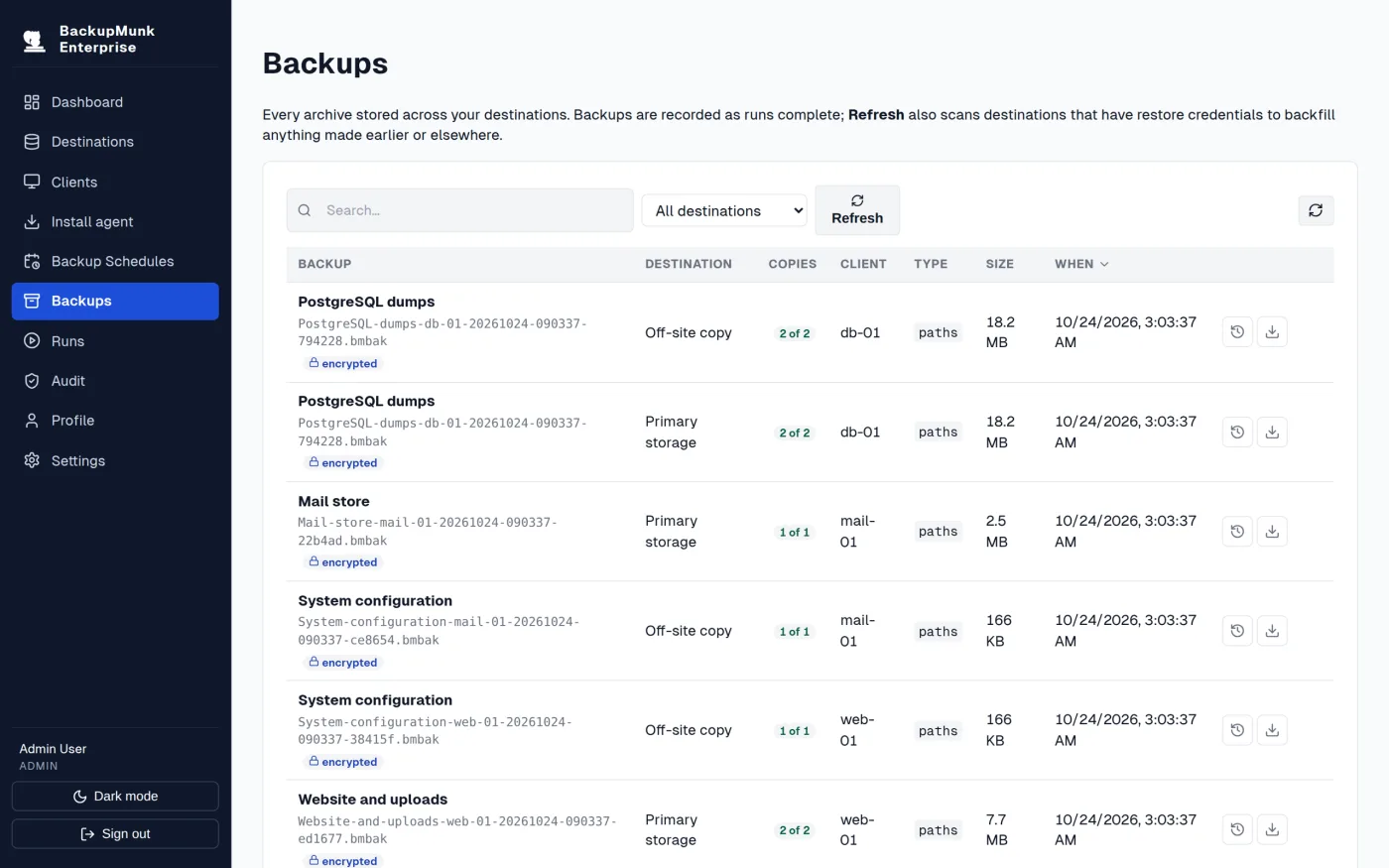
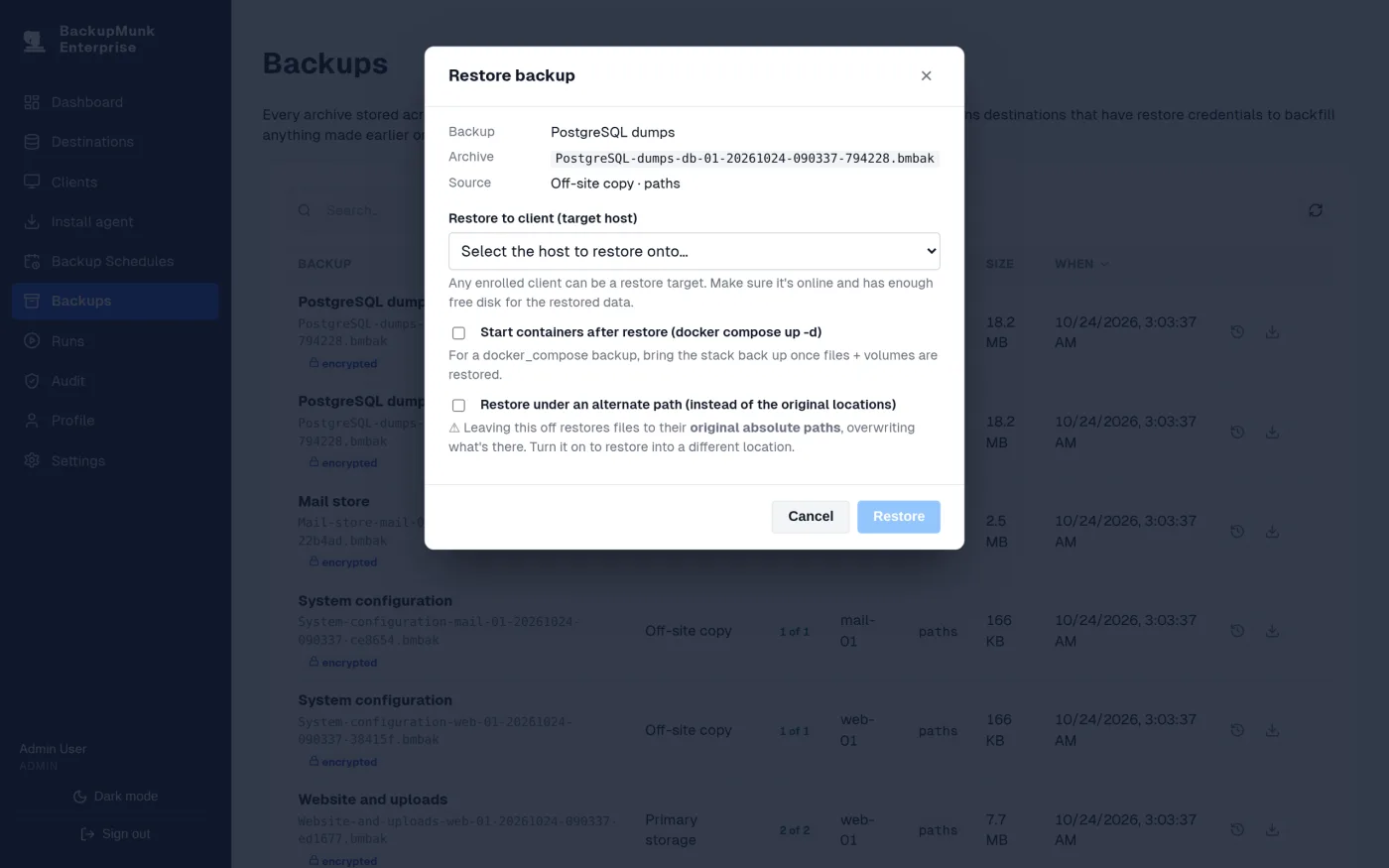
Restore in place, under another folder or onto a different machine.
No inbound access
Agents connect out over HTTPS, so hosts behind NAT or in other networks need no open ports.
Dashboard, alerts and audit
Run history and success rates at a glance, email and Pushover alerts, OIDC single sign-on, roles and a full audit log.
Self-updating agents
Agents update themselves, with safeguards so a bad build can’t take the fleet down.
Linux, Windows and macOS
A single binary for Linux (amd64, arm64), macOS (Intel, Apple silicon) and Windows, plus .deb and .rpm packages.
Pricing
Free to start, licensed when you need more
BackupMunk takes encrypted, scheduled backups without a license. Licenses are verified offline, and BackupMunk keeps working through a grace period if it can’t reach our store.
Free
Without a license
- Scheduled, encrypted backups through the server to one destination
- FIPS 140-3 mode for FIPS-validated cryptography
- Retention, so old backups are removed automatically
- Dashboard and audit log
- Offline recovery with bmrecover, which always works
Base plan
CA$10 a month for 5 hosts, plus CA$2 a month for each extra host. Or CA$100 a year.
Everything free, plus
- Direct uploads from each host to storage
- Several destinations per backup
- Incremental backups
- Restores from the web console
- Audit shipping to your SIEM
Try every feature free for 30 days on up to 5 hosts, with no card needed. When the trial ends, the free features keep working, and buying a plan converts the same license.
FAQ
Questions about BackupMunk Enterprise
What do I need to run it?
A Linux host with Docker Compose for the server, and S3-compatible storage or Backblaze B2. Agents run on Linux (amd64, arm64), macOS and Windows.
Do protected hosts need open inbound ports?
No. Agents make outbound HTTPS connections to the server; the server never connects into a host.
Where are my backups stored?
In your own storage buckets. Archives are encrypted on the host before upload, and each has a small manifest next to it so the catalog can be rebuilt from the bucket alone.
Which encryption does BackupMunk use? Is there a FIPS 140-3 mode?
Backups are encrypted on each host before upload, with a separate key per destination. By default BackupMunk uses ChaCha20-Poly1305 and Argon2id. In FIPS 140-3 mode, which needs no license, it uses only FIPS-approved algorithms (AES-256-GCM, P-256 and PBKDF2-HMAC-SHA256), and the server and agents run on the Go Cryptographic Module v1.0.0, validated under FIPS 140-3 (CMVP certificate #5247). Existing backups keep restoring in either mode.
What if the BackupMunk server itself is lost?
Promote a paired hot standby, or restore archives offline with bmrecover and the destination’s recovery passphrase. Set a recovery passphrase on every destination.
Does BackupMunk do incremental backups?
Yes, with a license. After a full backup, each run stores only the files, Docker volume files and container images that changed, and restoring any backup applies its chain automatically.
Is there a free trial?
Yes. The 30-day trial covers 5 hosts with every licensed feature and needs no payment details. When it ends, BackupMunk keeps working on its free tier.